Quick CSV tools
Download any unsaved edits before reloading. Confirm the file is CSV or TSV, then try a sample file. Selected files have an upper limit of 1 GiB, 5 million data records and 2,000 columns. Available browser storage can impose a lower limit. Very wide records, oversized fields and the 100,000 stored-page cap can also stop import before those limits. Pasted CSV text is limited to 50 MiB. For larger input, choose a local file instead. If import reports insufficient storage, free space for this site or choose a smaller file. Converters, merge, compression and task calculations retain their own limits; opening a larger file in the editor does not raise those limits.
CSV Viewer by Loam browser extension
Click the extension toolbar action to open its viewer, then choose a UTF-8 CSV or TSV file. The extension accepts up to 20 MB, 100,000 data rows, and 200 columns. If a file does not open, try the bundled sample and check the file encoding and separator.
Search finds text across all columns. Use the filter beneath a column heading to narrow matches in that column, and click the heading to cycle through ascending, descending, and original order. Columns lets you hide or show columns. Filters on hidden columns still apply; Clear filters removes both search and column filters.
Export filtered CSV downloads the visible columns and all matching rows, including rows on other pages. Copy table puts the same results, with headers, on your device's clipboard as tab-separated text for pasting into a spreadsheet. If clipboard access is denied, export the CSV instead. These actions do not overwrite your source file. Closing or reloading the viewer clears the file from the tab but does not remove downloads or clipboard copies.
Report your browser version, extension version, and the error text through the contact path below. Do not attach the file or its contents.
CSV Editor for Google Drive
Install CSV Editor from Google Workspace Marketplace to open and edit CSV files from Google Drive.
Connect Google Drive, then choose CSV Editor from a CSV file's Open with menu or Drive's New menu. This integration supports one UTF-8 CSV up to 2 MB, 25,000 cells, 5,000 rows and 200 columns.
Save to Drive replaces the selected file. The editor checks for changes immediately before saving and stops if the file changed. If Google does not provide an atomic version check, another edit made during the save could still be overwritten. If someone else may be editing the file, use Save a copy. A detected conflict keeps your edits in the open tab; keep the tab open until a copy is saved. File contents travel directly between your browser and Google, without a copy on our server.
If your Google connection expires, choose Reconnect Google; your edits stay in the open tab. If a save result is uncertain, check the file in Drive before trying again. Do not refresh or close the tab while you have unsaved edits.
CSV File Tools for Webflow
If CSV File Tools is installed in your Webflow workspace, open the app from the Designer. Choose CSV to preview a local UTF-8 file up to 256 KiB, or choose Try sample. Your CSV needs a header row with unique, non-empty column names and the same number of values in every row. The source is limited to 200 columns and 50,000 cells.
- Choose from the first 20 data rows and select up to 10 columns. Add a table caption of 1–120 characters.
- In the Designer, select the page body or a plain layout container, such as a div or section, outside reusable components. Text and form elements are not supported destinations.
- Choose Inspect selected container, check the values and destination, then select I reviewed the values, selection and destination.
- Choose Insert new table. Check the new table's caption, headings and values in the Designer, then style it there. Use Webflow's Undo if you want to remove the insertion.
For example, a product code such as 00123 stays text with its leading zeros. Long identifiers, quoted commas and formula-like values also remain literal text; formulas and HTML are not executed. The app adds a new table without replacing existing content and does not publish your site. Your file is processed on your device; the chosen values become part of your Webflow page when you insert them.
If insertion is unavailable, check the caption, row and column selection, inspected destination and review checkbox. After changing the destination, inspect and review it again. For invalid UTF-8, save a UTF-8 CSV copy; for malformed CSV or duplicate headings, correct a separate copy before reopening it. Keep your original file: choosing another file clears the current preview. Try sample to check the app separately from your file. For help, use the contact form below with the action and non-sensitive error text; do not send private CSV contents, site details or credentials.
CSV File Tools for Front
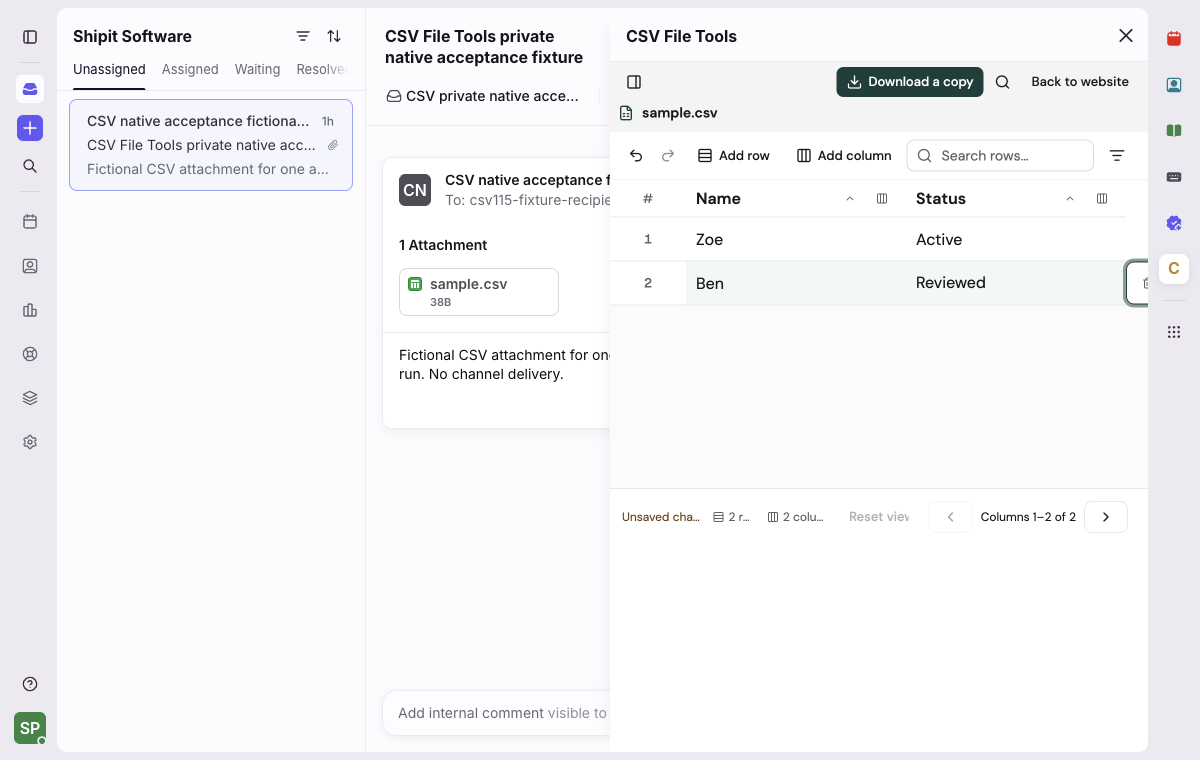
If CSV File Tools is available in your Front workspace, open a conversation containing a UTF-8 CSV attachment, then open the plugin in the sidebar. Open the message so Front has loaded its content. Choose Find CSV attachments, then choose the filename. No separate CSV File Tools account or Core API token is needed.
- Check the headers and rows. In a narrow sidebar, use the column navigation at the bottom to reach another column.
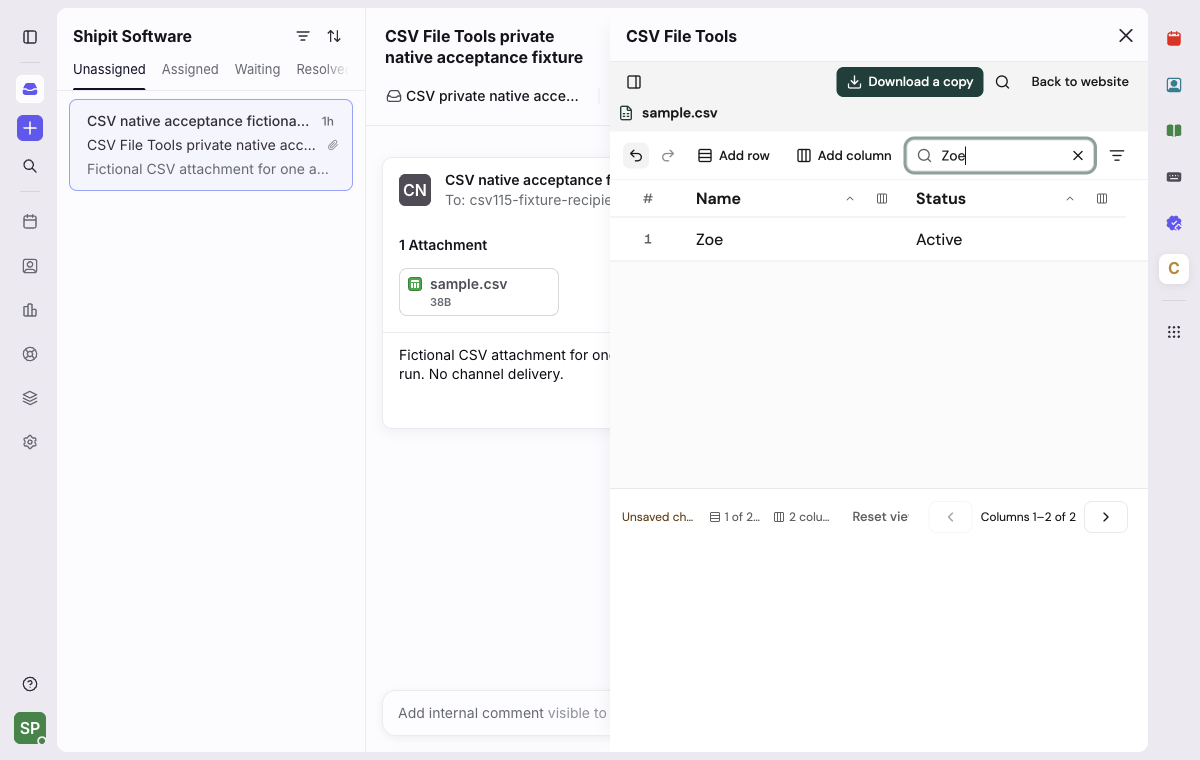
- Edit a cell and press Tab to commit it. Search rows changes the preview without removing records from the document.
- Choose Download a copy, then open the downloaded file to check it. The copy includes every row, including rows hidden by search. Reattaching or sending it in Front is a separate action.
For example, in a file with Name and Status columns, change Ben's Status from Pending to Reviewed, then search for Zoe. The downloaded copy still contains Ben with Reviewed, while Front's original attachment still contains Pending. Editing does not change the original message or attachment.
Attachments must be UTF-8 CSV files no larger than 2 MiB. Discovery covers loaded messages in the selected conversation, up to five message pages; it does not search your whole inbox. If an attachment is missing, open its message in Front and choose Find CSV attachments again.
Download before closing or reloading the plugin: edits stay in the current editor frame's memory. Back to website offers a discard confirmation when edits exist; Cancel keeps the document and search. Unsaved changes may remain after downloading because the original attachment was not saved.
If the plugin cannot open the attachment, download it through Front and choose it in the standalone CSV editor as a separate workflow. Read the Front privacy details. For help, use the contact form below with the Front/browser version, action and non-sensitive error text. Do not send private attachments, message details, launch parameters or credentials.
CSV File Tools for Trello
If CSV File Tools is enabled on your Trello board, open a card with a CSV attachment. Use the card's CSV files section or Edit CSV action. Open the attachment's ordinary Trello link, download it, then choose Choose CSV in the editor and select that local file. No separate CSV File Tools account is needed.
Use comma-separated UTF-8 CSV up to 5 MiB, 50,000 cells and 200 columns. Values remain text: a code such as 001 keeps its leading zeroes, and =1+1 is not evaluated. Edit a cell and use Undo to reverse a change. Filter rows narrows the preview; Download edited CSV still includes every row, including rows on other pages.
Download edited CSV creates a separate local copy. Reopen that copy to check your changes, then reattach it in Trello yourself if needed. The Power-Up does not replace the original attachment or write to the card. Edits remain in the editor's memory and can be lost when the frame closes or reloads. Download before closing; an unsaved-changes warning is not guaranteed.
If a replacement file is invalid, your current document stays open. Cancel in Choose another CSV? keeps your edits. If the Power-Up does not finish loading, keep the file downloaded from Trello and use the standalone CSV editor as a separate workflow. For help, use the contact form below with the action and non-sensitive error text; do not send private attachments or card details.
CSV File Tools for Coda
Install the free CSV File Tools Pack to check, filter, sort and update CSV text in a Coda document.
After installing, open Packs → CSV File Tools → Building blocks. Drag a function card into your document to insert its linked formula. Use the inserted function rather than typing a Pack prefix. Supply the CSV text or a cell containing it.
- InspectCsv: check record and column counts and preview the first five records.
- FilterCsv: keep rows with an exact match, such as keeping Open in column 1 when Status is the second column.
- SortCsv: put rows in ascending or descending text order using a chosen column.
- EditCsvCell: return a copy with one cell changed, such as changing row 1, column 0 to a new task name.
Rows and columns start at 0; row 0 is the header. Filter and sort keep the header by default. Values remain text, so numbers and dates are not automatically converted or sorted numerically. Use comma-separated CSV within 32,000 text characters per input and CSV result (some symbols count as two), 50,000 cells and 200 columns.
Coda processes the formula inputs and results. These formulas do not send CSV to our site or other network destinations. They return text without changing the original cell, table or file; importing files into Coda tables and downloading files are separate workflows. Report the function name and non-sensitive error text through the form below.
CSV Editor desktop app
On Windows or macOS, confirm the file ends in .csv, then open it from inside CSV Editor. Drag and drop is also available. Windows packages can register Open with after installation; the first Mac App Store release does not claim Finder open-with support. The selected file name and rows should appear in the editor. If saving fails, keep the window open and try Save As with a new name in a folder you can write to. Do not discard edits or close the app until you have saved a copy. Include your macOS or Windows version, CSV Editor version, the action that failed, and non-sensitive error text in a report. Do not include the file or its contents.
CSV Editor for Visual Studio Code
Right-click a .csv or .tsv tab, choose Reopen Editor With…, then CSV Editor. The editor supports UTF-8 files up to 5 MiB, 50,000 cells and 200 columns. Save with VS Code; Save As, Auto Save and Undo/Redo use its document handling. Larger or malformed files can still open in the text editor.
If another editor changes the file during a pending grid edit, review the current source and copy the retained draft from the recovery field before proceeding. If saving fails, keep the document open and try Save As in a location you can write to. Report your VS Code version, extension version, operating system, steps to reproduce and non-sensitive error text using the form below. Do not send private files, paths or credentials.
CSV Editor for ChatGPT
Open the editor from a CSV file in ChatGPT. Check that the file uses UTF-8 and is within 5 MiB, 50,000 cells, and 200 columns. Saving needs ChatGPT to grant write access and provide the file version needed to check for conflicting changes. If Save is unavailable, check the displayed explanation.
If the file changed elsewhere or saving fails, your edits remain in the open editor. Use Download CSV to preserve a separate copy when ChatGPT supports downloads, then deliberately reload the source before editing again. Reloading discards unsaved edits. Download includes every record, even when a search hides some rows, and does not save changes to the original.
Report the editor version, ChatGPT platform, steps to reproduce, and non-sensitive error text through the contact path below. Use a small fictional CSV example if needed. Do not send private file contents, file references, or credentials.
Loam-backed analysis or CSV Viewer MCP
Analyze with SQL supports CSV and Parquet files up to 5 GiB. If analysis or CSV Viewer MCP needs attention, sign out and back in, verify the authorized workspace still contains the dataset, and reconnect the exact resource shown on the MCP page. Never include access tokens, credentials, customer rows, or private file contents in a support report.
Request deletion of CSV Editor mobile data
CSV Editor by Loamstack for Android and iOS is published by Shipit Software. No account is required. To ask us to delete information we hold about your mobile app use or support requests, use the contact form below.
- State that you are requesting deletion of CSV Editor mobile data.
- Provide a reply email address so we can follow up. If available, include an earlier support request reference or other non-sensitive details that help us identify the records.
- Submit the form. Do not send private CSV contents, passwords, credentials or access tokens.
We delete identifiable support and operational records covered by your request when we can identify them. Ordinary network logs may not always be attributable to you. Some records may be retained where needed for security, legal obligations or other retention requirements explained in our privacy policy.
Your CSV document contents and private working copies are processed on your device and are not held by us as part of routine mobile analytics. Clearing app data or uninstalling can remove local working copies, preferences and the installation identifier; it does not delete reports already received or files you exported. Delete exported files through the storage location or document provider you chose.